Most organizations are in a hurry to adopt Generative AI (GenAI) solutions like Copilot for Microsoft 365 to help bolster productivity, automate tasks, and improve efficiency. According to McKinsey’s most recent Global Survey on AI, “65% of respondents report that their organizations are regularly using gen AI, nearly double the percentage from our previous [2023] survey just ten months ago.” And global AI adoption has surged from an average of ~50% to more than 72%.
While some companies have chosen not to use generative AI company-wide (usually because of security concerns), these companies often find that employees take matters into their own hands — using publicly available large language models (LLMs) like ChatGPT, which may put sensitive company data at risk anyway.
In this blog post, we’ll look at how public and private GenAI tools are used at most organizations, and how Seclore can help protect sensitive data from being inadvertently shared or exposed to unauthorized users.
Copilot for Microsoft 365
Copilot is an AI-powered productivity tool that combines large language models (LLMs) with content from Microsoft 365 applications like Word, Excel, Powerpoint, Teams, and others to generate context-specific responses anchored in an organization’s data. With this data, Copilot can help users draft documents, analyze data, answer questions, and streamline workflows to enhance productivity and make repetitive or time-consuming tasks more efficient.
Copilot for Microsoft 365 was designed to only surface organizational data that an individual user has at least “view” permission to access. As a result, here’s what Microsoft has to say about rights management in their Copilot documentation:
How it works:
- User prompts are sent to Copilot
- Copilot accesses Graph + (optional) Web + Other services for grounding
- Copilot sends modified prompt to Large Language Model (LLM)
- Copilot receives LLM response
- Copilot access Graph for Compliance and Purview
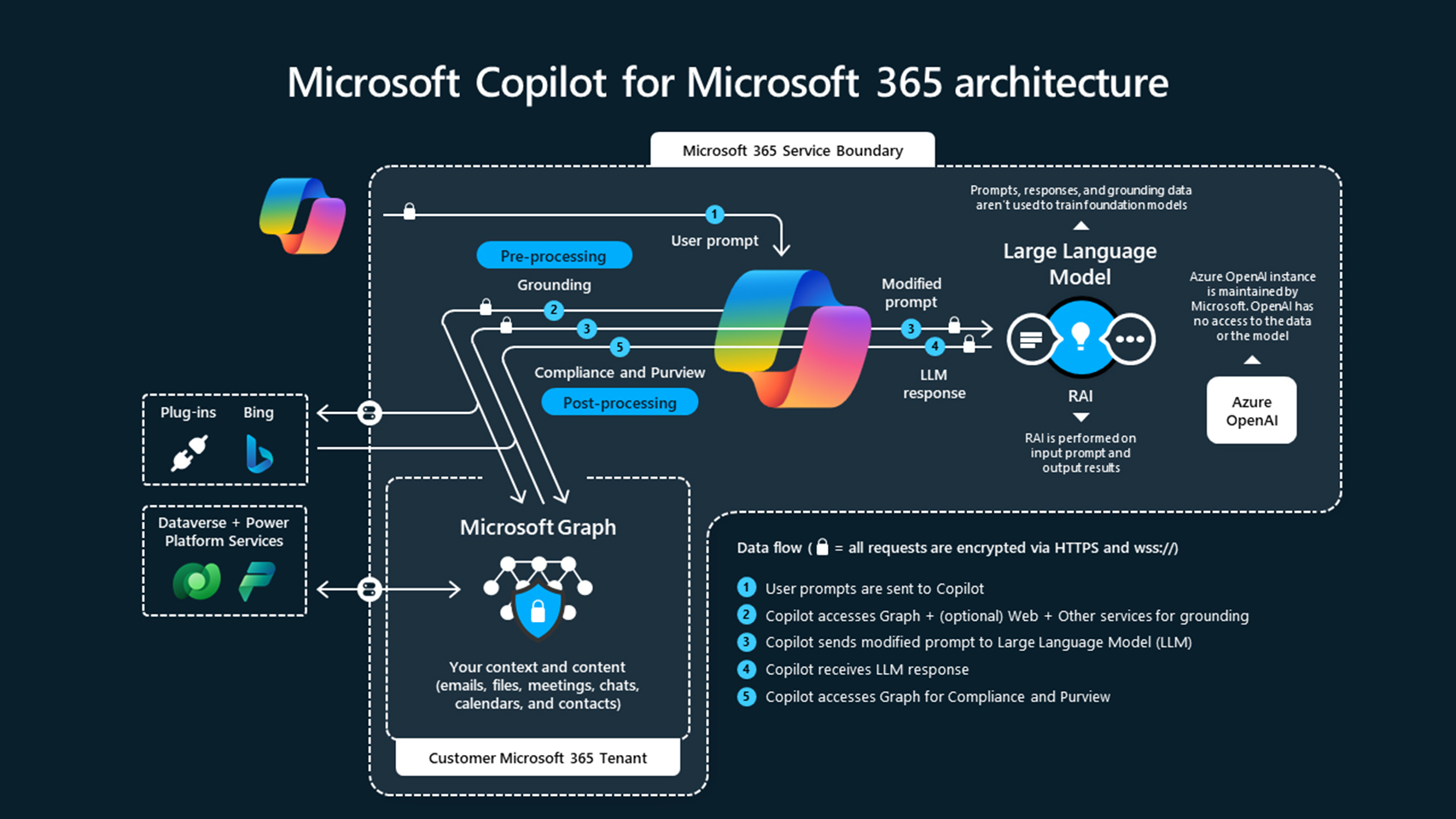
Figure 1: How Microsoft Copilot for Microsoft 365 works
The Challenge
In theory, Copilot sounds great, but there are many hidden security risks. While Microsoft has done their best to keep security in mind when building this product, data and information security teams need to be aware that Copilot essentially has the keys to the castle — it can pull sensitive or proprietary information from any file a user has access to. This presents a problem for most organizations, where it’s very likely that users have access to more files than they should.
According to concentric.ai’s survey of 550 million data records:
- The average organization has 802,000 files at risk due to oversharing
- 16% of an organization’s critical data is overshared
- 17% of at-risk files were overshared with third parties
- 90% of business–critical documents are shared outside the C-suite
And the following factors put these companies at greater risk:
- Broad access policies: Many companies utilize organization-wide access policies. This means that Copilot could access any data a user has permission to view, which raises serious concerns around data security and leakage.
- Limited permission management: Inadequate access controls can lead to sensitive and proprietary data being accidentally leaked.
- Ineffective data governance: Copilot results don’t inherit sensitivity labels from their source material, which can lead to poor data governance and the potential mishandling of sensitive information.
- Employee training and awareness: Employees may not be aware of the inherent risks associated with Generative AI solutions like Copilot, which can further expose organizations and deepen vulnerabilities.
How to protect your data
Data should remain protected in the Microsoft ecosystem as long as organizations have airtight access control and data protection policies in place. Unfortunately, that’s rarely the case, which is why you should consider taking these six steps before adopting Copilot for your organization.
Explicitly define sensitive data: Some data, like personally identifiable information (PII) that can be used to discern an individual’s identity, is relatively easy to identify. Other data like financial information, contract terms, intellectual property, and offer letters can be much harder to pin down. Defining a clear and detailed data governance policy can help establish access-control and security policies that limit access exclusively to those who need it.
Locate and catalog sensitive data: You can start by identifying highly sensitive information like intellectual property, financial, and customer data. It’s also important to understand how, and on what channels data flows both inside and outside your organization. This can help create sharing policies that make the most sense for your organization.
Standardize classification labels: Organizations benefit tremendously from common nomenclature, particularly when it comes to classification labels that help employees properly identify and handle sensitive information. Once terms have been agreed upon, organizations can more effectively leverage tools like Microsoft Purview, or data loss prevention (DLP) tools to help discover, classify, and protect sensitive data.
Review access controls: Determine whether data in your organization is generally shared with users or groups. Although it may be counterintuitive, group membership is usually preferred because it’s easier to automate adding/removing users.
Adopt change management processes: Employee onboarding and offboarding should be consistent and timely. This will help keep groups and access-control lists up to date.
Establish policy life cycle management: Data protection and access control policies must evolve over time. Rapidly growing companies should regularly update these policies and perform a gap analysis addressing what is implemented today compared to what the organization may need in the near future.
Adopt data-centric security: Data protection and access control policies must evolve over time. Rapidly growing companies should regularly update these policies and perform a gap analysis addressing what is implemented today compared to what the organization may need in the near future.
Summary
While Generative AI tools like Copilot for Microsoft 365 are a game-changer and have countless benefits for most organizations, they also come with some inherent risks. These risks highlight the reality that most organizations overshare sensitive information and adopt access-control policies that aren’t necessarily in line with their data governance policies. There are several steps that organizations can take to ensure tools like Copilot only generate results a user already has access to. However, we recommend that security conscious organizations adopt a data-centric security solution like Seclore to prevent highly sensitive data from being shared unwittingly.
Enterprise GenAI tools like Copilot for Microsoft 356 and ChatGPT Enterprise
Seclore-protected files cannot be indexed by enterprise GenAI tools like Copilot for Microsoft 365, effectively preventing sensitive data from being accidentally exposed to unauthorized users.
Public LLMs like ChatGPT, Gemini, and Copilot
Seclore can prevent users from copying and pasting sensitive data into public LLMs, so that data won’t be used to train the model and potentially show up in another user’s prompt results.
AI-Powered Cyberattacks
Cybercriminals are leveraging AI to propagate more sophisticated, frequent, and customized attacks. That’s why it’s more important than ever to add more layers of protection to enhance your security posture.
About Seclore
Seclore helps organizations protect sensitive information wherever it goes. Our data-centric approach ensures that only authorized individuals have access to sensitive digital assets both inside and outside your organization. Seclore’s data-centric security platform powers continuous encryption, classification, rights management, tracking, and reporting for the entire lifecycle of digital assets and integrates seamlessly with other security solutions.
Schedule a demo to learn why leading enterprises choose Seclore to protect and control their digital assets without sacrificing innovation and seamless collaboration.

Jeff leads Product and Content Marketing at Seclore, and has a wide-range of experience driving successful outcomes and scaling companies. Prior to joining Seclore, he led go-to-market (GTM) and Product Marketing at startups like Tailscale, and large organizations like DocuSign, Stanford Law School, Portal, and many others. Jeff specializes in operationalizing marketing and enablement processes that drive desired outcomes for product and sales-led SaaS companies. In this spare time, Jeff mentors early-career marketers and serves on the board of a local non-profit community arts center.